Teradata’s HANA Mathematics

I recently pointed out some silliness published by Teradata to several SAP prospects. There is more nonsense that was sent and I’d like to take a moment to clear up these additional claims.

In their note to HANA prospects they used the following numbers from the paper SAP published here:

# of Query Streams

1

10 20

25

# of Queries per Hour (Throughput)

6,282

36,600 48,770

52,212

Teradata makes several claims from these numbers. First they claim that the numbers demonstrate a bottleneck that is tied to either the NUMA effect or to the SMP Knee Curve. This nonsense is the subject of a previous blog here.

For any database system as you increase the number of queries to the point where there is contention the throughput decreases. This is just common sense. If you have 10 cores and 10 threads and there is no contention then all threads run at the same speed as fast as possible. If you add an 11th thread then throughput falls off, as one thread has to wait for a core. As you add more threads the throughput falls further until the system is saturated and throughput flattens. Figure 1 is an example of the saturation curve you would expect from any system as the throughput flattens.

There are some funny twists to this, though. If you are an IMDB then each query can use 100% of a core. If you are multi-threaded IMDB then each query can use 100% of all cores.  If you are a disk-based system then you give up the CPU to another query while you wait for I/O… so throughput falls. I’ll address these twists in a separate blog… but you will see a hint at the issue here.

Teradata claims that these numbers reflect a scaling issue. This is a very strange claim. Teradata tests scaling by adding hardware, data, and queries in equal amounts to see if the query performance holds constant… or they add hardware and data to look for a correlation between the number of nodes and query performance… hoping that as the nodes increase the response time decreases.  In fact Teradata scales well… as does HANA… But the hardware is constant in the HANA benchmark so there is no view into scaling at all. Let me emphasis this… you cannot say anything about scaling from the numbers above.

Teradata claims that they can extrapolate the saturation point for the system… this represents very bad mathematics. They take the four data points in the table and create an S curve like the one in Figure 1… except they invert it to show how throughput decreases as you move towards the saturation point… Figure 2 shows the problem.

If you draw a straight line through the curve using any sort of math you miss the long tail at the end. This is an approximation of the picture Teradata drew… but even in their picture you can see a tail forming… which they ignore. It is also questionable math to extrapolate from only four observations. The bottom line is that you cannot extrapolate the saturation point from these four numbers… you just don’t know how far out the tail will run unless you measure it.

To prove this is nonsense you just have to look here. It turns out that SAP publicly published these benchmark results in two separate papers and this second one has numbers out to 60 streams. Unsurprisingly at 60 streams HANA processed 112,602 queries per hour while Teradata told their customers that it would saturate well short of that… at 49,601 queries (they predicted that HANA would thrash and the number of queries/hour would fall back… more FUD).

Teradata is sending propaganda to their prospects with scary extrapolations and pronouncements of architectural bottlenecks in HANA. The mathematics behind their numbers is weak and their incorrect use of deep architectural terms demonstrates ignorance of the concepts.  They are trying to create Fear, Uncertainty, and Doubt. Bad marketing… not architecture, methinks.
Microsoft SQL Server Announcements – November 2012

Here is one I composed for SAP on the HANA blog about the recent Microsoft SQL Server announcements that is not too obnoxiously pro-HANA. It is more about the data architecture required to handle a world where the client is a mobile device and every query must complete sub-second. This, I believe is where we are headed… taking those BI queries that run in an hour on weak warehouses and improving the response to 10 seconds won’t cut it if your user is on a mobile device… and if the query is customer-facing you will be out of business…

The only way to solve for this is to get lots of silicon between you and your data… and hope that no queries miss the cache… or put it all in-memory.

———

I might have added to the work post that anytime a database vendor pre-announces a product that is due out in 1-2 years,  “2014-2015” in this case, it is marketing not architecture… meant to freeze SQL Server customers in place while Microsoft tries to catch up.

Make sure to have a look at the comments… there is a great link to a Microsoft mouthpiece who suggests that I must have no technical background and that I am a liar. Nice.

“Big Data is Essentially All Data” – B. Devlin

I would like to recommend you to Barry Devlin’s post here titled “Big Data is Dead… Long Live All Data”. The post ends with the paragraph:

“All this says to me that big data as a technological category is becoming an increasingly meaningless name.  Big data is essentially all data.  Is there any chance that the marketing folks can hear me?”

I could not agree more. If “big data” is meaningful then, as I have argued, it must be a new thing associated with several newish sources of data that come in large volumes like social media data or sensor data or log data. But the term is so abused that I no longer believe that it is salvageable. Big Data is all data… it is any data…

So of course it is true that business must prepare for it (here), that cloud computing must support it (here), that it is more than just a technology issue (here), that organizations need to be aligned (here)… and so on (note that these are just the four most recent tweets on my feed… I could go on and on). How can this be the driver of new IT spending? How can it be the driver of anything?

The point is that everything that has ever been said about data and data warehousing is being restated as new thinking related to big data. If we measured the information entropy we would find no new information is present.

Big Data is Big Hype… Fuel for Bloggers and Pundits…


Teradata, HANA and NUMA

Teradata is circulating a document to customers that claims that the numbers SAP has published in its 100TB PoC white paper (here) demonstrates that HANA suffers from scaling issues associated with the NUMA-effect. The document is so annoyingly inaccurate that I have to respond.

NUMA stands for non-uniform-memory-access. This describes an architecture whereby each core in a multi-core system has some very fast local memory accessed directly through a memory bus… but has access to every other core’s local memory through a “remote” access hop over another fast bus. In the case of Intel Xeon servers the other fast bus is know as the QPI bus. “Non-uniform” means that all memory access are not equal… a remote access over the QPI bus is slower than access over the memory bus.

The first mistake in the Teradata document is where they refer to the problem as the “SMP Knee Curve”. SMP stands for symmetric multi-processing… an architecture where multiple cores share the same memory bus. The SMP Knee Curve describes the problem when too many cores are contending for the same bus. HANA is not certified to run on an SMP system. The 100TB PoC described above is not run on an SMP system. When describing issues you might expect Teradata to at least associate the issue with the correct hardware architecture.

The NUMA-effect describes problems scaling processors within a single NUMA node. Those issues can impact the ability to continuously add cores as memory locking issues across the QPI bus slow the system. There are ways to mitigate this problem, though (see here for some examples of how to code around the problem).

Of course HANA, which built an in-memory system with NUMA as a target from the start… has built in these NUMA mitigations. In fact, HANA is designed deeper still using special techniques to keep the processor caches filled and to invoke special-purpose SIMD instructions. HANA is built so close to the hardware that processor cycles that are unused due to cache misses but show up as processor busy are avoided (in other words, HANA will get more work done on a 100% CPU busy system than other software that will show 100% CPU busy). But Teradata chose to ignore this deep integration… or they were unaware of these techniques.

Worse still, the problem Teradata calls out… shouts out… is about scaling over 100 nodes in a shared-nothing configuration. The NUMA-effect has nothing at all to do with scale out across nodes. It is an issue within a single node. For Teradata to claim this is silliness at best. It is especially silly since the shared-nothing architecture upon which HANA is built is the same architecture Teradata uses.

The twists Teradata applies to the numbers are equally absurd… but I’ll stop here and hope that the lack of understanding they exhibit in throwing around terms like “SMP Knee Curve” and “NUMA-effect” will cast enough doubt that the rest of their marketing FUD will be suspect. Their document is surely not about architecture… it is weak marketing… you can see more here

Netezza Workload Management

@henryccook made an interesting point regarding Netezza workload management this morning… He suggested that once a SPU is engaged by a snippet the work must be completed before another snippet can start. To say this another way…  a SPU has no OS and cannot save context for a snippet and start another… then return.

If this is true it means that if a long-running snippet starts… a full file scan of a fact table with no use of the zone map… then that snippet will lock out others queries until it completes.

This is not a very fine-grained approach to workload management and we would expect it to cause difficulties.

Can anyone confirm that this is true? It feels right from an architectural perspective…


Price/Performance of HANA, Exadata, Teradata, and Greenplum

Here is an attempt to build a Price/Performance model for several data warehouse databases.

Added on February 21, 2013: This attempt is very rough… very crude… and a little too ambitious. Please do not take it too literally. In the real world Greenplum and Teradata will match or exceed the price/performance of Exadata… and the fact that the model does not show this exposes the limitations of the approach… but hopefully it will get you thinking… – Rob

For price I used some $$/Terabyte numbers scattered around the internet. They are not perfect but they are close enough to make the model interesting. I used:

Database

$$/TB

HANA

$200,000

Exadata X3

$66,000

Teradata

$66,000

Greenplum

$30,000

Of these numbers the one that may be the furthest off is the HANA number. This is odd since I work for SAP… but I just could not find a good number so I picked a big number to see how the model came out. Please, for any of these numbers provide a comment and I’ll adjust.

For each product I used the high performance product rather than the product with large capacity disks…

I used latency as a stand-in for performance. This is not perfect either… but it is not too bad. I’ll try again some other time and add data transfer time to the model. Note that I did not try to account for advantages and disadvantages that come from the software… so the latency associated with I/O to spool/work  files is not counted… use of indexes and/or column store is not counted… compression is not counted. I’ll account for some of this when I add in transfer times.

I did try to account for cache hits when there is SSD cache in the configuration… but I did not give HANA credit for the work done to get most data from the processor caches instead of from DRAM.

For network latency I just assumed one round trip for each product…

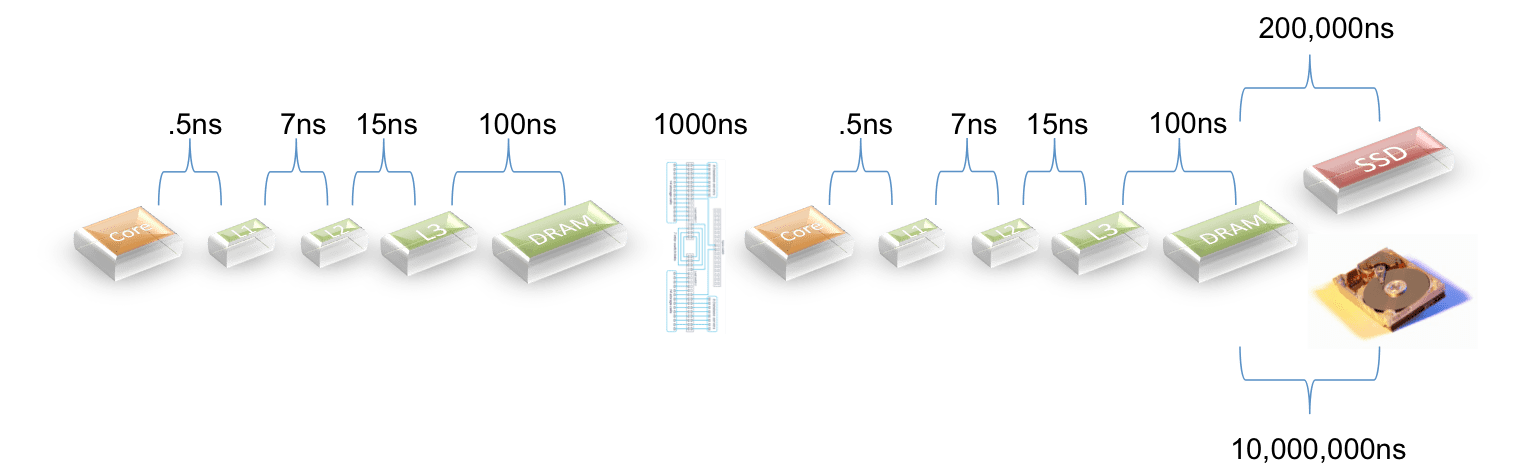
For latencies I used the picture below:

The exception is that for products that use PCIe to access SSDs I cut the latency by 1/3 based on some input from a vendor. I could not find details on the latency for Teradata’s Bynet so I assumed that it is comparable with Infiniband and the newest 10GigE switches.

Here is what I came up with:

Database

Total Latency(ns) Price/Performance

Delta

HANA

90

1,800

HANA (2 nodes)

1190

23,800

13x

Exadata X3

2,054,523

13,559,854

7533x

Teradata

4,121,190

27,199,854

15111x

Greenplum

10,001,190

30,003,570

16669x

I suppose that if a model seems to reflect reality then it is useful?

HANA has the lowest latency because it is in-memory. When there are two nodes a penalty is paid for crossing the network… this makes sense.

Exadata does well because the X3 product has SSD cache and I assumed an 80% hit ratio.

Teradata does a little worse because I assumed a lower hit ratio (they have less SSD per TB of data).

Greenplum does worse as they do all I/O against disks.

Note the penalty paid whenever you have to go to disk.

Let me say again… this model ignores lots of software features that would affect performance… but it is pretty interesting as a start…

Data Recovery in HANA, TimesTen, and SQLFire

There is a persistent myth, like a persistent cough, that claims that in-memory databases lose data when a hardware failure takes down a node because memory is volatile and non-persistent. This myth is marketing, not architecture.

Most RDBMS products: including Oracle, TimesTen, and HANA; have three layers where data exists: in-memory (think SGA for Oracle), in the log, and on disk. The normal process goes like this:

  1. A write transaction arrives
  2. The transaction is written to the log file and committed… this is a very quick process with 1 sequential I/O… quicker still if the log file is on a SSD device
  3. The query updates the in-memory layer; and
  4. After some time passes, saves the in-memory data to disk.

Recovery for these databases is easy to understand:

  • If a hardware failure occurs and #1 but before #2 the transaction has not been committed and is lost.
  • If a hardware failure occurs after #2 but before #3 the transaction is committed and the database is rebuilt when the node restarts from the log file.
  • If a hardware failure occurs after #3 but before #4 the same process occurs… the database is rebuilt when the node restarts from the log file.
  • If a hardware failure occurs after #4 the database is rebuilt from the disk copy.

SQLFire uses a different approach (from here):

“Unlike traditional distributed databases, SQLFire does not use write-ahead logging for transaction recovery in case the commit fails during replication or redundant updates to one or more members. The most likely failure scenario is one where the member is unhealthy and gets forced out of the distributed system, guaranteeing the consistency of the data. When the failed member comes back online, it automatically recovers the replicated/redundant data set and establishes coherency with the other members. If all copies of some data go down before the commit is issued, then this condition is detected using the group membership system, and the transaction is rolled back automatically on all members.”

Redundant in-memory data optimizes transaction throughput but requires twice the memory. There are options to persist data to disk… but these options provide an approach that is significantly slower than the write-ahead logging used by TimesTen and HANA (and Oracle and Postgres, and …).

The bottom line: IMDBs are designed in the same manner as other, disk-based, DBMSs. They guarantee that comitted data is safe… everytime.

P.S.

See here for how these DBMSs compare when a BI/analytic workload is applied.

More on The Future of Hadoop and of Big Data DBMSs


First, you should look at Google’s Spanner paper here… this is the next-gen from Google and once it is embraced by the open source community it will put even more pressure on the big data DBMSs. Also have a look at YARN the next Map/Reduce… more pressure still…

Next… you can imagine that the conventional database folks will quibble a little with my analysis. Lets try to anticipate the push-back:

  • Hadoop will never be as fast as a commercial DBMS

Maybe not… but if it is close then a little more hardware will make up the difference… and “free” is hard to beat in price/performance.

  • SSD devices will make a conventional DBMS as fast as in-memory

I do not think so… disk controllers, the overhead of non-memory I/O, and an inability to fully optimize processing for in-memory will make a big difference. I said 50X to be conservative… but it could be 200X… and a 200X performance improvement reduces the memory required to process a query by 200X… so it adds up.

  • The Price of IMDB will always be prohibitive

Nope. The same memory that is in SSD’s will become available as primary memory soon and the price points for SSD-based and IMDB will converge.

  • IMDB won’t scale to 100TB

HANA is already there… others will follow.

  • Commercial customers will never give up their databases for open source

Economics means that you pay me now or you pay me later… companies will do what makes economic sense.

The original post on this is here

Commercial Post Update: HANA and Exalytics and Teradata and IMDB Economics

English: Hawaiian spear fisherman near Hana; Maui, Hawai‘i. ca. 1890. (Photo credit: Wikipedia)

Here are links to several commercial posts on the Experience HANA Blog FYI…

The Five Minute Rule and HANA: This is a rehash of my posts here applying the famous Five Minute Rule to in-memory databases.

HANA & Exalytics: There is Barely Any Comparison: This is a rehash of my post here pointing out that Exalytics and HANA do not really compete.

HANA vs. Teradata – Part 1: This is a response to some poor thinking posted by Teradata. There is some new content that could be worth a look.

HANA vs. Teradata – Part 2: This continues the response… but it is a rehash of the post here on the rational economics of in-memory databases. Frankly, I had just reread the Teradata posts and wrote this while still annoyed… as a result it is a little flip and despite the junk posted by Teradata I might have shown them a little more respect…

Exalytics vs. Exadata: This post suggests some oddness in Oracle’s positioning of Exalytics and Exadata… maybe worth a look.

Exadata 3 as an In-Memory Database (IMDB)

English: Larry Ellison lecturing during Oracle OpenWorld, San Francisco 2010 עברית: לארי אליסון מרצה בכנס אורל בסאן פרנסיסקו (Photo credit: Wikipedia)

Wikipedia defines computer memory as:


In computing, memory refers to the physical devices used to store programs (sequences of instructions) or data (e.g. program state information) on a temporary or permanent basis for use in a computer or other digital electronic device. The term primary memory is used for the information in physical systems which are fast (i.e. RAM), as a distinction from secondary memory, which are physical devices for program and data storage which are slow to access but offer higher memory capacity. Primary memory stored on secondary memory is called “virtual memory“.


The term “storage” is often (but not always) used in separate computers of traditional secondary memory such as tape, magnetic disks and optical discs (CD-ROM and DVD-ROM). The term “memory” is often (but not always) associated with addressable semiconductor memory, i.e. integrated circuits consisting of silicon-based transistors, used for example as primary memory but also other purposes in computers and other digital electronic devices.


To a computer program like a DBMS, memory is a resource allocated using commands like malloc() and calloc(). Note that these commands allocate primary memory using the definition above. From this you should conclude that an in-memory DBMS (IMDB) is a system that puts all of its data into memory allocated by the database program.


In their announcements this week Oracle states (here) that Exadata 3 is an in-memory database machine and Larry Ellison said. “Everything is in memory. All of your databases are in-memory. You virtually never use your disk drives. Disk drives are becoming passe. They’re good at storing images and a lot of data we don’t access very often.”


But their definition of in-memory includes SSD devices that are not directly addressable by the DBMS. In fact they use 22TB of SSDs and 4TB of DRAM. The SSDs are a cache sitting between the DBMS and disk storage. They are storage according to Wikipedia.


Exadata 3 is not an in-memory database machine. It takes more than lots of hardware to make a DBMS an in-memory DBMS.


Oracle is spewing marketing, not architecture.


Exit mobile version
%%footer%%