Wondering About Netezza… and A Teradata Prediction Comes True…

Magic 8 Ball
Magic 8 Ball (Photo credit: Wikipedia)

If you missed the tweet… 2+ years ago I predicted here that Teradata would go away from ByNet… and lo and behold they did (see here).

In the same post I predicted that Netezza would go away from FPGAs. This has not come to pass. But I wonder if it might… or if there is a bigger change possible?

With the recent announcements of DB2 BLU and column store I suspect that DB2 will outperform Netezza when the query mix does not fall directly in Netezza’s sweet spot.

I also have a suspicion that the Netezza architecture, with its execution engine split across two different processors, is just hard to engineer. I cannot think of another reason features come so slowly there. Why, for example, is there no columnar support? Greenplum built it on the same Postgres base with less than a handful of engineers in a year. Teradata now offers columnar tables as well.

These concerns… combined with some previous notes on Netezza add up as follows:

  1. FPGAs no longer provide a performance advantage (per my link above)
  2. FPGAs limit the ability of the DBMS to use more cores (see here)
  3. FPGAs limit the ability of the DBMS to manage workload (see here… and especially the comments)
  4. FPGAs and having a 2-phase split execution environment limits the ability to extend and enhance the code base (a new conjecture)
  5. Zone Maps and CBTs provide a limited ability to solve for a wide range of queries… they are just an index (see here)
  6. DB2 Column Store provides a performance boost equal to or greater than zone maps and CBTs (a new conjecture)
  7. DB2 BLU provides a performance boost well in excess of what Netezza can provide (see here)

The Netezza architecture with FPGAs provided a distinct advantage in 2000 when CPU was the scarce commodity. But multi-core systems and the advance of Moore’s Law soon made processing abundant… and the advantage of FPGA co-processing diminished. Without a distinct advantage the split execution architecture became a disadvantage… and the complexity of that design kept Netezza from developing the advances on top of the Postgres base that were very easy to develop by others.

Architecture counts… and DB2 is a strong product. If, as I suspect, DB2 is now a more capable product than Netezza… I wonder what path IBM may take?

MPP, IMDB and Moore’s Law

In the post here I listed the units of parallelism (UoP) applied by various products on a single node. Those findings are summarized in the table below.

Product

Version/HW

Cores per Node

UoP per Node

Notes

Teradata EDW 6700H

16

32

Uses hyper-threads.
Greenplum DCA UAP Edition

16

8

Recommends 1 Segment for each 2 cores. Maybe some multi-threading per query so it could be greater than 8 on the average… and could be 16 with hyper-threads… but not more than 32 for sure.
Exadata X3

12

12-24

Maybe only 12… cannot find if they use hyper-threads.
Netezza Striper

16

16

May use hyper-threads but limited by 16 FPGAs.
HANA Any Xeon E7-4800

40

80

Uses hyper-threads.

A UoP is defined as the maximum number of  instructions that can execute in parallel on a single node for a single query. Note that in the comments there was a lively debate where some readers wanted to count threads or processes or slices that were “active” but in a wait state. Since any program can start threads that wait I do not count these as UoP (later we might devise a new measure named units of waiting that would gauge the inefficiency in any given design by measuring the amount of waiting around required to keep the CPUs fed… maybe the measure would be valuable in measuring the inefficiency of the queue at your doctor’s office or at any government agency).

On some CPUs vendors such as Intel allow two threads to execute instructions in-parallel in a core. This is called hyper-threading and, if implemented, it allows for two UoP on a single core. Rather than constantly qualify the statements for the rest of this blog when I refer to cores I mean to imply hyper-threads.

The lively comments in the blog included some discussion of the sort of techniques used by vendors to try and keep the cores in the CPU on each node fed. It is these techniques that lead to more active I/O streams than cores and more threads than cores.

For several years now Intel and the other CPU manufacturers have been building ever more cores into their products. This has allowed them to continue the trend known as Moore’s Law. Multi-core is now a fact of life and even phones, tablets, and personal computers have multi-core chips.

But if you look at the table  you can see that the database products above, even the newly announced products from Teradata and Netezza, are using CPUs with relatively few cores. The high-end Intel processors have 40 cores and the databases, with the exception of HANA, use Intel products with at most 16 cores. Further, Intel will deliver Ivy Bridge processors to the market this year with 120 cores. These vendors know this… yet they have chosen to deliver appliances with the previous generation CPUs. You might ask why?

I believe that there is an architectural reason for this (also a marketing reason covered here).

It is very hard to keep 80 cores fed with data when you have to perform block I/O. It will be nearly impossible to keep the 240 cores coming with Ivy Bridge fed. One solution is to deploy more nodes in a shared-nothing configuration with fewer cores per node… but this will be expensive requiring more power, floorspace, administration, etc. This is the solution taken by most of the vendors above. Another solution is to solve the problem without I/O with an in-memory database (IMDB) architecture. This is the solution taken by SAP with HANA.

Intel, IBM, and the rest will continue to build out using the multi-core approach for the foreseeable future. IMDB products will be able to fully utilize this product. Other products will struggle to take full advantage as we can see already… they will adapt and adjust and do what they can… but ultimately IMDB will win, I think… because there is just no other way to keep up as Moore’s Law continues to drive technology… no other way to feed the CPU engines with data fast enough.

If I am right then you will see more IMDB offerings from more vendors, including from the major vendors in the near future (note that this does not include the announcements of “database in memory” from Oracle which is not by any measure an in-memory database).

This is the underlying reason why Donald Feinberg (and Timo Elliott) are right on here. Every organization will be running in-memory… and soon.

MPP on HANA, Exadata, Teradata, and Netezza

6 May… There is a good summary of this post and on the comments here.  – Rob

17 April… A single unit of parallelism is a core plus a thread/process to feed it instructions plus a feed of data. The only exception is when the core uses hyper-threading… in which case 2 instructions can execute more-or-less at the same time… then a core provides 2 units of parallelism. All of the other stuff: many threads per core and many data shards/slices per thread are just techniques to keep the core fed. – Rob

16 April… I edited this to correct my loose use of the word “shard”. A shard is a physical slice of data and I was using it to represent a unit of parallelism. – Rob

I made the observation in this post that there is some inefficiency in an architecture that builds parallel streams that communicate on a single node across operating system boundaries… and these inefficiencies can limit the number of parallel streams that can be deployed. Greenplum, for example, no longer recommends deploying a segment instance per core on a single node and as a result not all of the available CPU can be applied to each query.

This blog will outline some other interesting limits on the level of parallelism in several products and on the definition of Massively Parallel Processing (MPP). Note that the level of parallelism is directly associated with performance.

On HANA a thread is built for each core… including a thread for each hyper-thread. As a result HANA will split and process data with 80 units of parallelism on a high-end 40-core Intel server.

Exadata deploys 12 cores per cell/node in the storage subsystem. They deploy 12 disk drives per node. I cannot see it clearly documented how many threads they deploy per disk… but it could not be more than 24 units of parallelism if they use hyper-threading of some sort. It may well be that there are only 12 units of parallelism per node (see here).

Updated April 16: Netezza deploys 8 “slices” per S-Blade… 8 units of parallelism… one for each FPGA core in the Twin times four (2X4) Twinfin architecture (see here). The next generation Netezza Striper will have 16-way parallelism per node with 16 Intel cores and 16 FPGA cores…

Updated April 17: Teradata uses hyper-threading (see here)… so that they will deploy 24 units of parallelism per node on an EDW 6700C (2X6X2) and  32 units of parallelism per node on an EDW 6700H (2X8X2).

You can see the different definitions of the word “massive” in these various parallel processing systems.

Note that the next generation of Xeon processors coming out later this year will have 8X15 processors or 120 cores on a fat node:

  • This will provide HANA with the ability to deploy 240 units of parallelism per node.
  • Netezza will have to find a way to scale up the FPGA cores per S-Blade to keep up. TwinFin will have to become QuadFin or DozenFin. It became HexadecaFin… see above. – Rob
  • Exadata will have to put 120 SSD/disk drive combos in each node instead of 12 if they want to maintain the same parallelism-to-disk ratio with 120 units of parallelism.
  • Teradata will have to find a way to get more I/O bandwidth on the problem if they want to deploy nodes with 120+ units of parallelism per node.

Most likely all but HANA will deploy more nodes with a smaller number of cores and pay the price of more servers, more power, more floor space, and inefficient inter-node network communications.

So stay tuned…

The Cost of Dollars per Terabyte

(Photo credit: Images_of_Money)

Let me be blunt: using price per terabyte as the measure of a data warehouse platform is holding back the entire business intelligence industry.

Consider this… The Five Minute Rule (see here and here) clearly describes the economics of HW technology… suggesting exactly when data should be retained in memory versus when it may be moved to a peripheral device. But vendors who add sufficient memory to abide by the Rule find themselves significantly improving the price/performance of their products but weakening their price/TB and therefore weakening their competitive position.

We see this all of the time. Almost every database system could benefit from a little more memory. The more modern systems which use a data flow paradigm, Greenplum for example, try to minimize I/O by using memory effectively. But the incentive is to keep the memory configured low to keep their price/TB down. Others, like Teradata, use memory carefully (see here) and write intermediate results to disk or SSD to keep their price/TB down… but they violate the Five Minute Rule with each spool I/O. Note that this is not a criticism of Teradata… they could use more memory to good effect… but the use of price/TB as the guiding principle dissuades them.

Now comes Amazon Redshift… with the lowest imaginable price/TB… and little mention of price/performance at all. Again, do not misunderstand… I think that Redshift is a good thing. Customers should have options that trade-off performance for price… and there are other things I like about Redshift that I’ll save for another post. But if price/TB is the only measure then performance becomes far too unimportant. When price/TB is the driver performance becomes just a requirement to be met. The result is that today adequate performance is OK if the price/TB is low. Today IT departments are judged harshly for spending too much per terabyte… and judged less harshly or excused if performance becomes barely adequate or worse.

I believe that in the next year or two that every BI/DW eco-system will be confronted with the reality of providing sub-three second response to every query as users move to mobile devices: phones, tablets, watches, etc. IT departments will be faced with two options:

  1. They can procure more expensive systems with a high price/TB ratio… but with an effective price/performance ratio and change the driving metric… or
  2. They can continue to buy inexpensive systems based on a low price/TB and then spend staff dollars to build query-specific data structures (aggregates, materialized views, data marts, etc.) to achieve the required performance.

It is time for price/performance to become the driver and support for some number of TBs to be a requirement. This will delight users who will appreciate better, not adequate, performance. It will lower the TCO by reducing the cost of developing and operating query-specific systems and structures. It will provide the agility so missed in the DW space by letting companies use hardware performance to solve problems instead of people. It is time.

Teradata, HANA and NUMA

Teradata is circulating a document to customers that claims that the numbers SAP has published in its 100TB PoC white paper (here) demonstrates that HANA suffers from scaling issues associated with the NUMA-effect. The document is so annoyingly inaccurate that I have to respond.

NUMA stands for non-uniform-memory-access. This describes an architecture whereby each core in a multi-core system has some very fast local memory accessed directly through a memory bus… but has access to every other core’s local memory through a “remote” access hop over another fast bus. In the case of Intel Xeon servers the other fast bus is know as the QPI bus. “Non-uniform” means that all memory access are not equal… a remote access over the QPI bus is slower than access over the memory bus.

The first mistake in the Teradata document is where they refer to the problem as the “SMP Knee Curve”. SMP stands for symmetric multi-processing… an architecture where multiple cores share the same memory bus. The SMP Knee Curve describes the problem when too many cores are contending for the same bus. HANA is not certified to run on an SMP system. The 100TB PoC described above is not run on an SMP system. When describing issues you might expect Teradata to at least associate the issue with the correct hardware architecture.

The NUMA-effect describes problems scaling processors within a single NUMA node. Those issues can impact the ability to continuously add cores as memory locking issues across the QPI bus slow the system. There are ways to mitigate this problem, though (see here for some examples of how to code around the problem).

Of course HANA, which built an in-memory system with NUMA as a target from the start… has built in these NUMA mitigations. In fact, HANA is designed deeper still using special techniques to keep the processor caches filled and to invoke special-purpose SIMD instructions. HANA is built so close to the hardware that processor cycles that are unused due to cache misses but show up as processor busy are avoided (in other words, HANA will get more work done on a 100% CPU busy system than other software that will show 100% CPU busy). But Teradata chose to ignore this deep integration… or they were unaware of these techniques.

Worse still, the problem Teradata calls out… shouts out… is about scaling over 100 nodes in a shared-nothing configuration. The NUMA-effect has nothing at all to do with scale out across nodes. It is an issue within a single node. For Teradata to claim this is silliness at best. It is especially silly since the shared-nothing architecture upon which HANA is built is the same architecture Teradata uses.

The twists Teradata applies to the numbers are equally absurd… but I’ll stop here and hope that the lack of understanding they exhibit in throwing around terms like “SMP Knee Curve” and “NUMA-effect” will cast enough doubt that the rest of their marketing FUD will be suspect. Their document is surely not about architecture… it is weak marketing… you can see more here

Price/Performance of HANA, Exadata, Teradata, and Greenplum

Here is an attempt to build a Price/Performance model for several data warehouse databases.

Added on February 21, 2013: This attempt is very rough… very crude… and a little too ambitious. Please do not take it too literally. In the real world Greenplum and Teradata will match or exceed the price/performance of Exadata… and the fact that the model does not show this exposes the limitations of the approach… but hopefully it will get you thinking… – Rob

For price I used some $$/Terabyte numbers scattered around the internet. They are not perfect but they are close enough to make the model interesting. I used:

Database

$$/TB

HANA

$200,000

Exadata X3

$66,000

Teradata

$66,000

Greenplum

$30,000

Of these numbers the one that may be the furthest off is the HANA number. This is odd since I work for SAP… but I just could not find a good number so I picked a big number to see how the model came out. Please, for any of these numbers provide a comment and I’ll adjust.

For each product I used the high performance product rather than the product with large capacity disks…

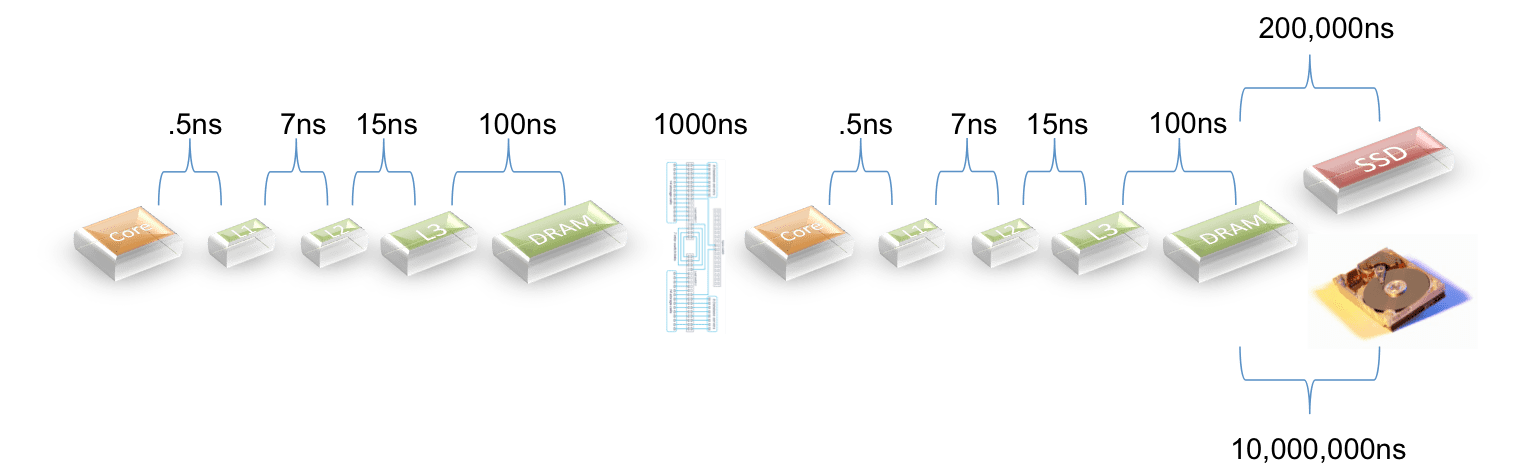
I used latency as a stand-in for performance. This is not perfect either… but it is not too bad. I’ll try again some other time and add data transfer time to the model. Note that I did not try to account for advantages and disadvantages that come from the software… so the latency associated with I/O to spool/work  files is not counted… use of indexes and/or column store is not counted… compression is not counted. I’ll account for some of this when I add in transfer times.

I did try to account for cache hits when there is SSD cache in the configuration… but I did not give HANA credit for the work done to get most data from the processor caches instead of from DRAM.

For network latency I just assumed one round trip for each product…

For latencies I used the picture below:

The exception is that for products that use PCIe to access SSDs I cut the latency by 1/3 based on some input from a vendor. I could not find details on the latency for Teradata’s Bynet so I assumed that it is comparable with Infiniband and the newest 10GigE switches.

Here is what I came up with:

Database

Total Latency(ns) Price/Performance

Delta

HANA

90

1,800

HANA (2 nodes)

1190

23,800

13x

Exadata X3

2,054,523

13,559,854

7533x

Teradata

4,121,190

27,199,854

15111x

Greenplum

10,001,190

30,003,570

16669x

I suppose that if a model seems to reflect reality then it is useful?

HANA has the lowest latency because it is in-memory. When there are two nodes a penalty is paid for crossing the network… this makes sense.

Exadata does well because the X3 product has SSD cache and I assumed an 80% hit ratio.

Teradata does a little worse because I assumed a lower hit ratio (they have less SSD per TB of data).

Greenplum does worse as they do all I/O against disks.

Note the penalty paid whenever you have to go to disk.

Let me say again… this model ignores lots of software features that would affect performance… but it is pretty interesting as a start…

30+ Year Old Database Architecture: DB2, Oracle, Postgres, Teradata, Sybase, and More…

As you look at the enterprise RDBMS marketplace today you will find something shocking… almost every product in the market is built based on designs and concepts that are over thirty years old. IBM’s System R grew into DB2 and influenced Oracle before 1980. Ingres, developed before 1980, became Postgres which became Netezza and Greenplum and more. Teradata was a fresh start… around 1980.

This is not a bad thing in its own right… but imagine the hardware architectures these systems were designed and optimized for. Maybe DB2 was built for a multi-core mainframe… maybe Oracle too… maybe. Memory was tiny… so memory management was important and memory was used sparingly. Data sizes were tiny. Consider the fact that Teradata named the company based on the belief that someday way beyond the planning horizon some customers might get to a terabyte of data.

The reality is that these old designs are inefficient. They have hacked the old code to continuously extend their products. I mean this as a compliment. It is not trivial engineering to find tweaks and tack-ons that make old code work on new hardware architectures. Teradata and Netezza and Greenplum designed ways to use multiple address spaces to take advantage of multiple cores. Oracle tacked-on a shared-nothing I/O subsystem to a shared-everything architecture to stretch.

But these hacks are not efficient.

Yale is working on some new-new stuff (see here). HANA is based on a completely different design (see here). The NoSQL vendors have bent the ACID-tested rules, if not always the fundamental approaches.

I can’t help but believe that in one of these new approaches is a path forward.

If you would like to read some history of the start here is a cool link.

The Rational Economics of In-memory Databases (Is memory getting cheaper faster than Data Warehouses are getting bigger?)

I have just written a commercial blog for work refuting some silliness from Teradata here and here. Since some of this refutes an argument that targets in-memory database architecture in general it is worth restating the case here.

The Teradata argument states that since data warehouses are growing 40% per year and the cost of memory is dropping only 20% per year that the economics of in-memory databases (IMDB) is “irrational” and that the whole IMDB idea is “hype”. Let’s have a look at the Teradata argument…

First, let’s imagine a 100TB data warehouse that is built today… and let’s imagine that it is economically reasonable today. There is an explicit argument for this here and an implicit argument here… but since the Teradata argument says that the IMDB economics get worse over time it really doesn’t matter where we start. If Teradata is right then time will tell.

Now lets apply Teradata’s economics for a couple of years…

Next year, according to Teradata, the data warehouse will have grown to 140TB and the cost of memory will have dropped 20%… making IMDB more economic. The following year your data warehouse will have grown to about 200TB and the cost of memory will have dropped another 20% making the IMDB even more cost-effective. The following year the DW will be 280TB  and the cost of memory will have dropped another 20% making it even more cost-effective.

In other words, the Teradata sound bite is silly. It has emotional appeal… but it is nonsense.

But there is more. Moore’s Law does not say that price will fall 2X every 2 years… it suggests that performance (actually transistor density) will improve 2X every two years. The fact is that memory prices are falling AND memory speeds are improving… and the gap between memory speeds and disk speeds is increasing. So the gap in price/performance of an IMDB vs. a disk-based system is increasing exponentially.

These are the economics that matter… and these are the economics that are driving Teradata to put silicon in-between their disks and their processors.

Teradata’s argument is marketing, not architecture.

A Quick Five Minute Rule Update for In-memory Databases

6/26/2014: I fixed the calculation… I had an error in my spreadsheet. Sorry. The 2012 break-even point is 217 minutes. – Rob

Following on to my blog on the Five Minute Rule and in-memory databases here I decided to quickly and informally recalculate the 4KB break-even point based on current technology (rather than use the 2007 numbers) The results are as follows:

  • A 1TB SATA Disk with 4.2ms average latency and 126MB/s max transfer rate costs $100 here
  • A 4GB DDR3 ECC memory card costs $33 here (I picked fairly expensive ECC memory… I could have gone with the $18 average price mentioned here)
  • Apply the Gray/Putzolu formula: Break Even Interval = (Pages per MB of RAM/Accesses per Second per Disk) * ($ per Disk Drive/$ per MB of RAM)

And we find that today the break-even point for a 4KB block of data is 217 minutes…

Again… this means that for any 4KB block of data… or for any database table where there are 4KB blocks that are touched… within a 3+ hour window it is more cost-effective to keep the data in-memory than to move it back and forth from disk. If the data is compressed the duration increases with the compression so that a table with 2X compression should reside in-memory if accessed on the average every 110 minutes.

The Five Minute Rule and In-memory Databases

I was recently reminded of a couple of papers written by Jim Gray and Gianfranco Putzolu  that calculated the cost of keeping data in memory vs the cost of paging it in from disk. I was happy to see that the thread was being kept alive by Goetz Graefe.

These papers used the cost of each media to determine how “hot” data needed to be to be cost-effectively stored in-memory. The 1987  five minute rule (click here to reference the original papers) was so named because at that time and based on the relative costs of CPU, Memory, and Disk; a 1KB  record that was accessed every five minutes could be effectively stored in memory and a 4KB block of data broke-even at two minutes.

In 2009, with CPU prices coming down but the number of instructions executed per second going up, and with memory and prices down, the break-even point between keeping 4KB in memory or on a SATA disk was 90 minutes.

Let’s be clear about what this means. Based solely on the cost of CPUs, RAM, and SATA drives; any data that is accessed more frequently than each 90 minutes should be kept in memory. This does not include any ROI based on the business benefits of a speedy response. It does not adjust for data compression which allows more than 4KB of user data to use 4KB of RAM. Just pure IT economics gets us to this point.

So… if you have data in a data warehouse or a mart that is touched by a query at least once every 90 minutes… it is wasteful to store it on disk. If you have an in-memory database than can compress the data 2X and use it in its compressed form, then the duration goes up to 180 minutes. You do not have to look any further than this to find the ROI for an in-memory data base (IMDB).


Exit mobile version
%%footer%%