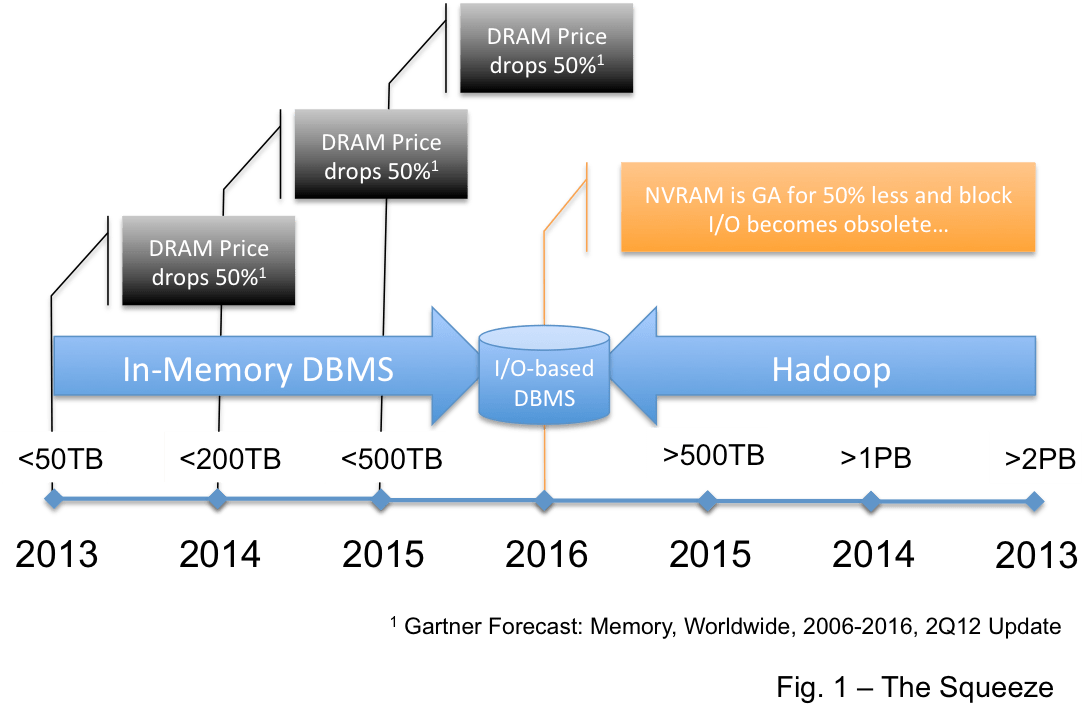
I would like to point out a very important section in the paper on Hekaton on the Microsoft Research site here. I will quote the section in total:
2. DESIGN CONSIDERATIONS
An analysis done early on in the project drove home the fact that a 10-100X throughput improvement cannot be achieved by optimizing existing SQL Server mechanisms. Throughput can be increased in three ways: improving scalability, improving CPI (cycles per instruction), and reducing the number of instructions executed per request. The analysis showed that, even under highly optimistic assumptions, improving scalability and CPI can produce only a 3-4X improvement. The detailed analysis is included as an appendix.
The only real hope is to reduce the number of instructions executed but the reduction needs to be dramatic. To go 10X faster, the engine must execute 90% fewer instructions and yet still get the work done. To go 100X faster, it must execute 99% fewer instructions. This level of improvement is not feasible by optimizing existing storage and execution mechanisms. Reaching the 10-100X goal requires a much more efficient way to store and process data.
This is important because it confirms the difference in a Level 3 and a Level 2 columnar implementation as described here. It is just not possible for a Level 2 implementation with a row-based join engine to achieve the performance of a Level 3 implementation. This will allow the Level 3 implementations: HANA, BLU, Hekaton, and Oracle 12c to distance themselves from the Level 2 products: Teradata and Greenplum; by more than 10X… and this is a very significant advantage.
This short post is intended to provide a quick warning regarding in-memory columnar and cpu requirements… with a longer post to follow.
When a row is inserted or bulk-loaded into a DBMS, if there are no indexes, the amount of cpu required is very small. The majority of the time is spent committing a transaction is the time to write a log record to persist the data.
When the same record is reformatted into a column the amount of processing required is significantly higher. The data must be parsed into columns, the values must be compressed, dictionaries may be updated, and the breadcrumbs that let the columnar data be regenerated into rows must be laid. Further, if the columnar structure are to be optimized then the data must be ordered… with a sort or some kind of index structure. I have seen academic papers that suggest that for an insert columnar processing may be 100X more than row processing… and you can see why this could be true (I apologize for not finding the reference… I’ll dig it up… as I recall I read it in a post some time back by Daniel Abadi).
Now let’s think about this… several vendors are suggesting that you can deploy their columnar features with no changes required… no new hardware… in-place. But this does not ring true if the new columnar feature requires 100X extra CPU cycles per row… or 50X… or 10X… unless you are running your database on an empty server.
This claim is a shot at SAP who, more honestly, suggests new hardware with high-end processors for their in-memory columnar product… but methinks it is marketing, not architecture, from these other folks.
Teradata stock is falling hard due to guidance here that they may miss revenue targets. Analysts are downgrading the stock… but mostly from Buy to Neutral.
Normally stock prices would not be a relevant topic for this blog… but in this case I believe that the Squeeze I suggested first in October of 2012 and then again in February of this year (here and here) has started to affect Teradata revenues.
Note that the Squeeze should affect Netezza, Exadata, and Greenplum as well… but the effect will not be so directly reflected in the stock prices of IBM, Oracle, or EMC/VMWare/GE.
I was asked to compose a post for the SAP HANA blog to help position HANA versus the other in-memory DBs… a marketing post… not a technical post. The result here makes it clear why I am not in marketing… it sounds like someone trying too hard to be a marketeer… Still… you might like the comments…
IBM is presenting a DB2 Tech Talk that compares the BLU Accelerator to HANA. There are several mistakes and some odd thinking in the pitch so let me address the issues as a way to explain some things about HANA and about BLU. This blog will consider what data needs to be in-memory.
IBM like several others, continues to repeat a talking point along the lines of: “We believe that you should not have to fit all of you active data in memory…”. Let’s think about this…
Note that in the current release HANA has a constraint that all of the data in a single column, the entire vector that represents the data in that column, must be in-memory before it can be operated on. If the table is partitioned and partition-elimination is applied then the data in the partition for the column must be loaded in-memory. This is a real constraint that will be removed in a subsequent release… but it is not a very severe constraint if you think about it.
But let’s be clear… HANA does not require all data to be in-memory… it will read data from peripheral devices in and out as required just as BLU does.
Now what does this mean? Let’s walk through some scenarios.
First, let’s imagine a customer with 10TB of user data, per the scenario IBM discusses. Let’s not get into a whose product compresses better discussion and assume that both BLU and HANA will get 4X compression… so there is 2.5TB of user data to be processed.
Now let’s imagine a system with only a very little memory available for data. In other words, let’s configure both BLU and HANA so that they are full columnar databases, but not in-memory databases. In this case BLU would operate by doing constant I/O without constraint and HANA would fail whenever it could not fit a required column in memory. Note that HANA might not fail at all… it would depend on whether there was a large single un-partitioned column that was required.
This scenario is really silly though… HANA is an in-memory database, designed to keep data in-memory from the start… so SAP would not support this imaginary configuration. The fact that you could make BLU work out of memory is not really relevant as nowhere does IBM position, or reference, BLU as a disk-based column store add-on… you would just use DB2.
Now let’s configure a system to IBM’s specification with 400GB of memory. IBM does not really say how much of this memory is available to BLU for data… but for the sake of argument let’s ignore the system requirements and assume that BLU uses one-half, 200GB, as work space to process queries so that 200GB is available to store data in-memory. As you will see it does not really matter in this argument whether I am spot on here or not. So using IBM’s recommendation there is now a 200GB cache that can be used as data is paged in and out. Anyone who has ever used a data warehouse knows that caching does not work well for BI queries as each query touches large enough volumes of the data to flush the cache… so BLU will effectively be performing I/O for most queries and is back to being an out-of-memory columnar database. Note that this flushing issue is why the in-memory capabilities from Oracle and Teradata pin certain tables into memory. In this scenario HANA will operate exactly as BLU does with the constraint that any single column that in a compressed form exceeds 200GB will not be able to be processed.
Finally let’s configure a system with 5TB of memory per SAP’s recommendation for HANA. In this case BLU and HANA both fit all of the data in-memory… with 2.5TB of compressed user data in and 2.5TB of work space… and there is no I/O. This is an in-memory DBMS.
But according to the IBM Power 770 spec (here) there is no way to get 5TB of memory on a single p770 node… so to match HANA and eliminate all I/O they would require two nodes… but BLU cannot be deployed on a cluster… so on they would have to deploy on a single node and perform I/O on 20% of the data. The latency for SSD I/O is 200Kns and for disk it is 10Mns… for DRAM it is 100ns and HANA loads full cache lines so that the average latency is under 20ns… so the penalty paid by BLU is severe and it will never keep up with HANA.
There is more bunk around recommendations for the number of cores but I can make no sense of it at all so I do not know where to begin to debunk it. SAP recommends high-end Intel servers to run HANA. In the scenario above we would recommend multiple servers… soon enough there will be Haswell servers with 6TB of DRAM and this case will run on one node.
I have stated repeatedly that anytime a vendor presents a slide comparing their product to their competitors you should immediately throw them out… it will always be twisted. Don’t trust them. And don’t trust me as I work for SAP. But hopefully you can see some logic in my case. If you need an IMDB then you need memory. If you are short of memory then the IMDB operates like a columnar RDBMS with a memory cache. If you are running a BI query workload then you need to pin data in the cache or the system will thrash. Because of this SAP recommends that you get enough memory to get all of the data in… we recommend that you operate our in-memory database product in-memory…
This really the point of the post. The Five Minute Rule informs us about what data should be in-memory (see here). An in-memory database is designed from the bottom up to manage hot data in-memory. The in-memory add-ons being offered over legacy systems are very capable and should not be ignored… and as the price of memory drops the Five Minute Rule will suggest that data in-memory will account for and ever larger percentage of your EDW. But to offer an in-memory capability and recommend that you should keep the bulk of the data on disk is silly… and to state that your product has a competitive advantage because you do not recommend that all of the data managed by your in-memory feature be kept in-memory is silliness squared.
I recently listened to a session by Juan Loalza of Oracle on the 12c In-memory option. Here are my notes and comments in order…
There is only one copy of the data on disk and that is in row format (“the column format does not exist on disk”). This has huge implications. Many of the implications come up later in the presentation… but consider: on start-up or recovery the data has to be loaded from the row format and converted to a columnar format. This is a very expensive undertaking.
The in-memory columnar representation is a fully redundant copy of the row format OLTP representation. Note that this should not impact performance as the transaction is gated by the time to write to the log and we assume that the columnar tables are managed by MVCC just like the row tables. It would be nice to confirm this.
Data is not as compressed in-memory as in the hybrid-columnar-compression case. This is explained in my discussion of columnar compression here.
Oracle claims that an in-memory columnar implementation (level 3 maturity by my measure see here) is up to 100X faster than the same implementation in a row-based form. Funny, they did not say that the week before OOW? This means, of course, that HANA, xVelocity, BLU, etc. are 100X faster today.
They had a funny slide talking about “reporting” but explained that this is another word for aggregation. Of course in-memory vector aggregation is faster in-memory.
There was a very interesting discussion of Oracle ERP applications. The speaker suggested that there is no reporting schema for these apps and that users therefore place indexes on the OLTP database to provide performance for reporting and analytics. It was suggested that a typical Oracle E-Business table would have 10-20 indexes on it and it was not unusual to see 30-40 indexes. It was even mentioned that the Siebel application main table could require 90 indexes. It was suggested that by removing these indexes you could significantly speed up the OLTP performance, speed up reporting and analytics, cure cancer and end all wars (OK… they did not suggest that you could cure cancer and end war… this post was just getting a little dry).
The In-memory option is clusterable. Further, because a RAC cluster uses shared disk and the im-memory data is not written to disk there is a new shared-nothing implementation included. This is a very nice and significant architectural advance for Oracle. It uses the direct-to-wire infiniband protocol developed for Exadata to exchange data. Remember when Larry dissed Teradata and shared-nothingness… remember when Larry dissed in-memory and HANA… remember when Teradata dissed HANA as nonsense and said SAP was over-reacting to Oracle. Gotta smile :).
Admins need to reserve memory from the SGA for the in-memory option. This is problematic for Exadata as the maximum memory on a RAC node is 256GB… My bad… Exadata X3-8 supports 2TB of memory per node… this is only problematic for Exadata X3-2 and below… – Rob
It is possible to configure a table partition into memory while leaving other partitions in row format on disk.
It is suggested again that analytic indexes may be dropped to speed up OLTP.
The presenter talked about how the architecture, which does not change the row-based tables in any way, allows all of the high-availability options available with Oracle to continue to exist and operate unchanged.
But the beautiful picture starts to dull a little here. On start-up or first access… i.e. during recovery… the in-memory columnar data is unavailable and loaded asynchronously from the row format on disk. Note that it is possible to prioritize the order tables are loaded to get high-priority data in-memory first… a nice feature. During this time… which may be significant… all analytic queries are run against the un-indexed row store. Yikes! This kills OLTP performance and destroys analytic performance. In fact, the presenter suggested that maybe you might keep some indexes for reports on your OLTP tables to mitigate this.
Now the story really starts to unravel. Indexes are required to provide performance during recovery… so if your recovery SLA’s cannot be met without indexes then you are back to square one with indexes that are only used during recovery but must be maintained always, slower OLTP, and the extra requirement for a redundant in-memory columnar data image. I imagine that you could throttle some reports after an outage until the in-memory image is rebuilt… but the seamless operations during recovery using standard Oracle HA products is a bit of a stretch.
Let me raise again the question I asked in my post last week on this subject (here)… how are joins processed between the row format and the columnar format. The presenter says that joins are no problem… but there are really only two ways… maybe three ways to solve for this:
When a row-to-columnar join is identified the optimizer converts the columnar table to a row form and processes the join using the row engine. This would be very very slow as there would be no indexes on the newly converted columnar data to facilitate the join.
When a row-to-columnar join is identified the optimizer pushes down aggregation and projection to the columnar processing engine and converts the columnar result to a row form and processes the join using the row engine. This would be moderately slow as there would be no indexes on the newly converted columnar data to facilitate the join (i.e. the columnar fact would have no indexes to row dimensions or visa versa).
When a row-to-columnar join is identified the optimizer converts the row table to a columnar form and processes the join using the columnar engine. This could be fast.
Numbers two and three are the coolest options… but number three is very unlikely due to the fact that columnar data is sharded in a shared-nothing manner and the row data is not… and number two is unlikely because if it were the case Oracle would surely be talking about it. Number one is easy and the likely state in release 1… but these joins will be very slow.
Finally, the presenter said that this columnar processing would be implemented in Times Ten and then in the Exalytics machine. I do not really get the logic here? If a user can aggregate in their OLTP system in a flash why would they pre-aggregate data and pass it to another data stovepipe? If you had to offload workload from your OLTP system why wouldn’t you deploy a small, standard, Oracle server with the in-memory option and move data there where, as the presenter suggested, you can solve any query fast… not just the pre-aggregated queries served by Exalytics. Frankly, I’ve wondered why SAP has not marketed a small HANA server as an Exalytics replacement for just this reason… more speed… more agility… same cost?
There you have it… my half a cents… some may say cents-less evaluation.
I will end this with a question for my audience (Ofir… I’ll provide a link to your site if you post on this…)… how do we suppose the in-memory option supports bulk data load? This has implications for data warehousing…
Here, of course, is the picture I should have used above… labeled as the in-memory database of your favorite vendor:
I changed the picture to show you the billboard SAP bought on US101N right across from the O HQ…
– Rob
Larry Ellison announced a new in-memory capability for Oracle 12c last night. There is little solid information available but taken at face value the new feature is significant… very cool… and fairly capable.
In short it appears that users have the ability to pin a table into memory in a columnar format. The new feature provides level 3 (see here) columnar capabilities… data is stored compressed and processed using vector and SIMD instruction sets. The pinned data is a redundant copy of the table in-memory… so INSERT/UPDATE/DELETE and data loads queries will use the row store and data is copied and converted to the in-memory columnar format.
As you can imagine there are lots of open questions. Here are some… and I’ll try to sort out answers in the next several weeks:
It seems that data is converted row-to-columnar in real-time using a 2-phased commit. This will significantly slow down OLTP performance. LE suggested that there was a significant speed-up for OLTP based on performance savings from eliminating indexes required for analytics. This is a little disingenuous, methinks… as you will most certainly see a significant degradation when you compare OLTP performance without indexes (or with a couple of OLTP-centric indexes) and with the in-memory columnar feature on to OLTP performance without the redundant copy and format to columnar effort. So be careful. The use case suggested: removing analytic indexes and using the in-memory column store is solid and real… but if you have already optimized for OLTP and removed the analytic indexes you are likely to see performance drop.
It is not clear whether the columnar data is persisted to disk/flash. It seems like maybe it is not. This implies that on start-up or recovery data is read from the row store on-disk tables and logs and converted to columnar. This may significantly impact start-up and recovery for OLTP systems.
It is unclear how columnar tables are joined to row tables. It seems that maybe this is not possible… or maybe there is a dynamic conversion from one form to another? Note that it was mentioned that is possible for columnar data to be joined to columnar data. Solving for heterogeneous joins would require some sophisticated optimization. I suspect that when any row table is mentioned in a query that the row join engine is used. In this case analytic queries may run significantly slower as the analytic indexes will have been removed.
Because of this and of item #2 it is unclear how this feature plays with Exadata. For lots of reasons I suspect that they do not play well and that Exadata cannot use the new feature. For example, there is no mention of new extended memory options for the Exadata appliance… and you can be sure that this feature will require more memory.
There was a new hardware system announced that uses this in-memory capability… If you add all of this up it may be that this is a system designed to run SAP applications. In fact, before the presentation on in-memory there was a long (-winded) presentation of a new Fujitsu system and the SAP SD benchmark was specifically mentioned. This was not likely an accident. So… maybe what we have is a counter to HANA for SAP apps… not a data warehouse at all.
As I said… we’ll see as the technical details emerge. If the architectural constraints 1-4 above hold then this will require some work for Oracle to compete with HANA for SAP apps or for data warehouse workloads…
In this blog I have stated explicitly and implied now and again that the big architectural features are what count… despite the fact that little features are often what are marketed. Here is a true story to reinforce this theme… and a reminder of the implications… a real-life battle between two vendors: we’ll call them NewVendor and LegacyVendor.
Four years ago, more or less, NewVendor sold a system to offload work from an existing LegacyVendor configuration. Winning the business was tough and the POC was a knife-fight. At that time the two vendors were architecturally similar with no major advantages on either side. In the end NewVendor won a fixed contract that provided 16 nodes and guaranteed to match the performance of LegacyVendor for a specific set of queries. The 16 node configuration was sized based on the uncompressed data in LegacyVendor’s system.
NewVendor sent in a team to migrate the data and the queries… what was expected to be a short project. But after repeated attempts and some outside effort by experts the queries were running 50% slower than the target. I was asked to have a look and could see no glaring mistakes that could account for such a large performance miss… I saw no obvious big tuning opportunities.
After a day or so of investigation I found the problem. LegacyVendor offered a nice dictionary-based compression scheme that shrunk the size of the data by… you guessed it… exactly 50%. Because the NewVendor solution had to read 50% more data with each query they were 50% slower. I recommended that NewVendor needed to supply eight more nodes to hit the performance targets.
In the course of making these recommendations I was screamed at, literally, by one technology executive and told that I was a failure by another. They refused to see the obvious, exact, connection between the performance and the compression. I was quickly replaced by another expert who spent four months on site tuning and tuning. He squeezed every last drop out of the database going so far as to reorder columns in every table to squeeze out gas where data did not align on word boundaries. His expert tuning managed to reduce the gap and in the end NewVendor purchased three fewer nodes than my recommendation. With those nodes they then hit the targets. But the cost of his time and expense (he was a contractor) exceeded the cost of the nodes he saved… and the extra four-month delay antagonized the customer such that the relationship never recovered.
In a world where the basics of query optimization and execution are known to all there are only big-ticket items that differentiate products. When all of the big-ticket, architectural, capabilities are the same the difference between any two mature RDBMS products will rarely be more than 10%-15% across a large set of queries. The big-ticket differentiators today are the application of parallelism, compression and column store, and I/O avoidance (i.e. in-memory techniques). The answer to the question who out-performs who can be found to a close approximation from looking at who is how parallel (here) and who is how columnar (here) and merging the two… with a dose of who best avoids I/O through effective use of memory. This is the first lesson of my story.
The second lesson is… throw hardware at tuning problems when there are no giant architectural mistakes. Even a fat server node costs around $15K… and you will be better off with faster hardware than with a warehouse or mart that is so finely tuned and fragile that the next change to the schema or the data volumes or the workload breaks it.
Epilogue
Soon after this episode NewVendor rolled out a Level 2 columnar feature. This provided them with a distinct advantage over LegacyVendor… an advantage almost exactly equal to their advantage in compression plus the advantage from columnar projection to reduce I/O… and for several years they did not lose a performance battle to LegacyVendor. Today LegacyVendor has a comparable capability and the knife-fight is on again… Architecture counts…
Hype Cycle for Emerging Technologies 2010 (Photo credit: marcoderksen)
As preface to this you might check out the definition I suggested for Big Data last week here… – Rob
I left Greenplum in large part because they made their mark in… and then abandoned… the data warehouse market for a series of big hype plays: first analytics and data science; then analytics, data science, and Hadoop; then they went “all-in”, their words, on Big Data and Hadoop… and now they are part of Pivotal and in a place that no-one can clearly define… sort of PaaS where Greenplum on HDFS is a platform.
It is not that I am a Luddite… I pretend each time I write this blog that I am in tune with the current and future state of the database markets… that I look ahead now and then. I just thought that it was unlikely for Greenplum to be profitable by abandoning the market that made them. At the time I suggested to them an approach that was founded in data warehousing but would let them lead in the hyped plays… and be there in front when, and if, those markets matured.
Now, if we were to define markets in an unambiguous manner:
a data warehouse database is primarily accessed through one or more BI tools;
an analytic database is primarily accessed through a statistical tool; and
Hadoop requires Hadoop;
then I suspect that the vast majority of Greenplum revenues still, 3-4 years after the move away from data warehousing, come from the DW market. It is truly a shame that this is not the focus of their engineering team and their marketeers.
Gartner has called it pretty accurately in their 2013 Hype Cycle for Emerging Technologies here. Check out where Big Data is on the curve and how long until it reaches the mainstream. Worse, here is a drill-down showing the cycle for just Big Data. Look at where Data Science sits and when they expect it to plateau. Look at where SQL for Hadoop is in the cycle.
Big Data is real and upcoming… but there is no concise definition of Big Data… no definition that does not overlap technologies that have been around since before the use of the term. There is no definition that describes a technology that the Fortune 1000 will take mainstream in the next 2-3 years. Further, as I have suggested here and here, open source products like Hadoop will annihilate the commercial market for big analytic databases and squeeze hard the big EDW DBMS players. It is just not a commercially interesting space… and it may not become commercially interesting if open source dominates (unless you are a services company).
Vendors need to be looking hard at Big Data now if they want to play in 2-3 years. They need to be building Big Data integration into their products and they need to be building Big Data apps that take the value straight into the business.
Users need to be looking carefully for opportunities to use Hadoop to reduce costs… and, in highly competitive markets which naturally generate lots of machine-to-machine data, they need to look for opportunities to get ahead of the competition.
But both groups need to understand that they are on the wrong side of the chasm (see here for reference to Crossing the Chasm)… they have to be Early Adopters with a culture that supports an early adopter business model.
We all need to avoid the mistake described in the introduction. We need to find commercially viable spots in an emerging technology play where we can deliver profits and ROI to our organizations. It is not that hard really to see hype coming if you are paying attention… not that hard to be a minor visionary. It is a lot harder to turn hype into profits…
I just finished a draft for next week on Big Data and thought that with this note I might form a preface…
First… Big Data is about, well…, Big Data. When Gartner devised the three V’s I suspect that they were trying to frame the new stuff that was emerging… not establish a concise definition. So let me be very clear about what I think that Big Data is and is not.
Big Data is about volume, not velocity, not variety. That is what the words “big” and “data” conjoined must mean. Velocity + Volume is Big Data. Variety + Volume is Big Data. By themselves Velocity and Variety are new, important, separate, technological trends.
Next, Big Data is a new thing. It is not a technology that was around in a meaningful way 5+ years ago. It was emerging just then so we should see evidence in the advances offered by the Web Scale companies like Google, Yahoo, and Netflix. It is not any data that was conventionally created, captured, or used before 2010 or so.
So what is new, big, and was emerging in recent history? It is the creation, capture, and use of machine-generated data: click-stream data, system log data, and sensor data. Big Data technology has to do with the creation, capture, and utilization of large volumes of machine-generated data… nothing more or less.
Rob: Big Data legitimately includes Social Data as well as Vitaliy rightfully commented… I’ll post on this soon…
Machines generate data at a very low-level of detail. It is said that the devil is in the detail… and the subject of the next post deals with the notion that in order to make our companies more profitable we must all chase this damnable devil.
PS
I wonder if damnable devil is redundant? Probably, yes.
2nd PS (sort of like 2nd breakfast)
Big Data is not about any and every new technology introduced in the last five years…