There seems to be a sort of odd tradition for bloggers to look back at the past year as the New Year starts to unfold. Here is my review of my posts and some presents
(Photo credit: Wikipedia)
…
Top Post
Far and away the most viewed post was Exalytics vs. HANA What are they thinking? This simply notes that these two products are not really comparable sharing only the descriptor “in-memory”.
These papers and the underlying thinking by smarter folks than I will inform you about the definition of Hot Data from the point of pure IT economics.
The Most Under-rated Post
This is the post I thought was the most important… as it might strongly influence data warehouse platform buying decisions over the next few years… And it might even influence the stocks you pick: The Future of Hadoop and Big Data DBMSs
Some Other Posts to Read
Here are two posts that informed me:
The Five Minute Rule… This will point you to a Wikipedia article that will point you to the whole series of papers.
What Every Programmer Should Know About Memory… This paper goes into gory detail about how memory works inside a processor. It is hardware-centric for you software folks… but provides the basis for understanding why in-memory DBMSs are fast and why Exadata is not an in-memory DBMS.
I posted a blog on the SAP site here that discussed the implications of mobile clients. I want to re-emphasize the issue as it is crucial.
While at Greenplum we routinely replaced older EDW platforms and provided stunning performance. I recall one customer in particular where we were given a query that ran in 7 hours and Greenplum executed the query in seven seconds. This was exceptional… more typical were cases where we reduced run-times from several hours to under 30 minutes… to 10 minutes… to 5 minutes. I’m sure that every major competitor: Teradata, Greenplum, Netezza, and Exadata has similar stories to tell.
But 5 minutes will not cut it if you are servicing a mobile client where sub-second response to the device is a requirement… and 10 minutes is out of the question. It does not matter if it ran in 10 hours before… 10 minute response is not acceptable to a mobile device.
Today we see sub-second response delivered to our phones by custom applications built on special high-performance platforms designed specifically to service a mobile client: iPhones, iPads, and Android devices.
But what will we do about the BI applications built on commercial platforms which have just used every trick in the book to become one of the 5 minute stories mentioned above?
I think that there are only a couple of architectural choices.
We can rewrite the high-value queries as custom applications using specialized infrastructure… at great expense… and leaving the vast majority of queries un-serviced.
We can apply the 80/20 rule to get the easiest queries serviced with only 20% of the effort. But according to Murphy the 20% left will be the highest value queries.
We can tack on expensive, specialized, accelerators to some queries… to those that can be accelerated… but again we leave too much behind.
Or we can move to a general purpose high performance computing platform that can service the existing BI workload with sub-second response.
In-memory computing will play a role… Exalytics provides option #3… HANA option #4.
SSD devices may play a role… but the performance improvements being quoted by vendors who use SSD as a block I/O device is 10X or less. A 10X improvement applied to a query that was just improved to 10 minutes yields a 1 minute query… still not the expected level of service.
IT departments will have to evaluate the price/performance, not just the price, as they consider their next platform purchases. The definition of adequate response is changing… and the old adequate, at the least cost, may not cut it. Mobile clients are here to stay. The productivity gains expected from these devices is significant. High performance BI computing is going to be a requirement.
When I was at Greenplum… and now again at SAP… I ran into a strange logic from Teradata about query concurrency. They claimed that query concurrency was a good thing and an indicator of excellent workload management. Let’s look at a simple picture of how that works.
In Figure 1 we depict a single query on a Teradata cluster. Since each node is working in parallel the picture is representative no matter how many nodes are attached. In the picture each line represents the time it takes to read a block from disk. To make the picture simple we will show I/O taking only 1/10th of the clock time… in the real world it is slower.
Given this simplification we can see that a single query can only consume 10% of the CPU… and the rest of the time the CPU is idle… waiting for work. We also represented some I/O to spool files… as Teradata writes all intermediate results to disk and then reads them in the next step. But this picture is a little unfair to Greenplum and HANA as I do not represent spool I/O completely. For each qualifying row the data is read from the table on disk, written to spool, and then read from spool in the subsequent step. But this note is about concurrency… so I simplified the picture.
Figure 2 shows the same query running on Greenplum. Note that Greenplum uses a data flow architecture that pushes tuples from step to step in the execution plan without writing them to disk. As a result the query completes very quickly after the last tuple is scanned from the table.
Let me say again… this story is about CPU utilization, concurrency, and workload management… I’m not trying to say that there are not optimizations that might make Teradata outperform Greenplum… or optimizations that might make Greenplum even faster still… I just want you to see the impact on concurrency of the spool architecture versus the data flow architecture.
Note that on Greenplum the processors are 20% busy in the interval that the query runs. For complex queries with lots of steps the data flow architecture provides an even more significant advantage to Greenplum. If there are 20 steps in the execution plan then Teradata will do spool I/O, first writing then reading the intermediate results while Greenplum manages all of the results in-memory after the initial reads.
In Figure 3 we see the impact of having the data in-memory as with HANA or TimeTen. Again, I am ignoring the implications of HANA’s columnar orientation and so forth… but you can clearly see the implications by removing block I/O.
Now let’s look at the same pictures with 2 concurrent queries. Let’s assume no workload management… just first in, first out.
In Figure 4 we see Teradata with two concurrent queries. Teradata has both queries executing at the same time. The second query is using up the wasted space made available while the CPUs wait for Query 1’s I/O to complete. Teradata spools the intermediate results to disk; which reduces the impact on memory while they wait. This is very wasteful as described here and here (in short, the Five Minute Rule suggests that data that will be reused right away is more economically stored in memory)… but Teradata carries a legacy from the days when memory was dear.
But to be sure… Teradata has two queries running concurrently. And the CPU is now 20% busy.
Figure 5 shows the two-query picture for Greenplum. Like Teradata, they use the gaps to do work and get both queries running concurrently. Greenplum uses the CPU much more efficiently and does not write and read to spool in between every step.
In Figure 6 we see HANA with two queries. Since one query consumed all of the CPU the second query waits… then blasts through. There is no concurrency… but the work is completed in a fraction of the time required by Teradata.
If we continue to add queries using these simple models we would get to the point where there is no CPU available on any architecture. At this point workload management comes into play. If there is no CPU then all that can be done is to either manage queries in a queue… letting them wait for resources to start… or start them and let them wastefully thrash in and out… there is really no other architectural option.
So using this very simple depiction eventually all three systems find themselves in the same spot… no CPU to spare. But there is much more to the topic and I’ve hinted about these in previous posts.
Starting more queries than you can service is wasteful. Queries have to swap in and out of memory and/or in and out of spool (more I/O!) and/or in and out of the processor caches. It is best to control concurrency… not embrace it.
Running virtual instances of the database instead of lightweight threads adds significant communications overhead. Instances often become unbalanced as the data returned makes the shards uneven. Since queries end when the slowest instance finishes it’s work this can reduce query performance. Each time you preempt a running query you have to restore state and repopulate the processor’s cache… which slows the query by 12X-20X. … Columnar storage helps… but if the data is decompressed too soon then the help is sub-optimal… and so on… all of the tricks used by databases and described in these blogs count.
But what does not count is query concurrency. When Teradata plays this card against Greenplum or HANA they are not talking architecture… it is silliness. Query throughput is what matters. Anyone would take a system that processes 100,000 queries per hour over a system that processes 50,000 queries per hour but lets them all run concurrently.
I’ve been picking on Teradata lately as they have been marketing hard… a little too hard. Teradata is a fine system and they should be proud of their architecture and their place in the market. I am proud to have worked for them. I’ll lay off for a while.
I recently pointed out some silliness published by Teradata to several SAP prospects. There is more nonsense that was sent and I’d like to take a moment to clear up these additional claims.
In their note to HANA prospects they used the following numbers from the paper SAP published here:
Teradata makes several claims from these numbers. First they claim that the numbers demonstrate a bottleneck that is tied to either the NUMA effect or to the SMP Knee Curve. This nonsense is the subject of a previous blog here.
For any database system as you increase the number of queries to the point where there is contention the throughput decreases. This is just common sense. If you have 10 cores and 10 threads and there is no contention then all threads run at the same speed as fast as possible. If you add an 11th thread then throughput falls off, as one thread has to wait for a core. As you add more threads the throughput falls further until the system is saturated and throughput flattens. Figure 1 is an example of the saturation curve you would expect from any system as the throughput flattens.
There are some funny twists to this, though. If you are an IMDB then each query can use 100% of a core. If you are multi-threaded IMDB then each query can use 100% of all cores. If you are a disk-based system then you give up the CPU to another query while you wait for I/O… so throughput falls. I’ll address these twists in a separate blog… but you will see a hint at the issue here.
Teradata claims that these numbers reflect a scaling issue. This is a very strange claim. Teradata tests scaling by adding hardware, data, and queries in equal amounts to see if the query performance holds constant… or they add hardware and data to look for a correlation between the number of nodes and query performance… hoping that as the nodes increase the response time decreases. In fact Teradata scales well… as does HANA… But the hardware is constant in the HANA benchmark so there is no view into scaling at all. Let me emphasis this… you cannot say anything about scaling from the numbers above.
Teradata claims that they can extrapolate the saturation point for the system… this represents very bad mathematics. They take the four data points in the table and create an S curve like the one in Figure 1… except they invert it to show how throughput decreases as you move towards the saturation point… Figure 2 shows the problem.
If you draw a straight line through the curve using any sort of math you miss the long tail at the end. This is an approximation of the picture Teradata drew… but even in their picture you can see a tail forming… which they ignore. It is also questionable math to extrapolate from only four observations. The bottom line is that you cannot extrapolate the saturation point from these four numbers… you just don’t know how far out the tail will run unless you measure it.
To prove this is nonsense you just have to look here. It turns out that SAP publicly published these benchmark results in two separate papers and this second one has numbers out to 60 streams. Unsurprisingly at 60 streams HANA processed 112,602 queries per hour while Teradata told their customers that it would saturate well short of that… at 49,601 queries (they predicted that HANA would thrash and the number of queries/hour would fall back… more FUD).
Teradata is sending propaganda to their prospects with scary extrapolations and pronouncements of architectural bottlenecks in HANA. The mathematics behind their numbers is weak and their incorrect use of deep architectural terms demonstrates ignorance of the concepts. They are trying to create Fear, Uncertainty, and Doubt. Bad marketing… not architecture, methinks.
To try and raise the level of understanding of readers about the implications of database architecture… architecture usually counts for more than features; and
To correct marketing claims that cannot be supported by the architecture.
When I was at Greenplum a small company then a small division at EMC… I hope that I kept a balance between the two. But I’m afraid that at SAP I am seeing more junk written about HANA than you can imagine… and I may be becoming unbalanced, in my blogging if not all around. Maybe there is too much HANA stuff?
To combat this I would like to solicit ideas and issues that you might like me to think about. If you see unfair or untrue marketing junk let me know and I’ll see if I can help unFUD it. I won’t promise to take on each and every submission… but I’ll do what I can.
Here is one I composed for SAP on the HANA blog about the recent Microsoft SQL Server announcements that is not too obnoxiously pro-HANA. It is more about the data architecture required to handle a world where the client is a mobile device and every query must complete sub-second. This, I believe is where we are headed… taking those BI queries that run in an hour on weak warehouses and improving the response to 10 seconds won’t cut it if your user is on a mobile device… and if the query is customer-facing you will be out of business…
The only way to solve for this is to get lots of silicon between you and your data… and hope that no queries miss the cache… or put it all in-memory.
———
I might have added to the work post that anytime a database vendor pre-announces a product that is due out in 1-2 years, “2014-2015” in this case, it is marketing not architecture… meant to freeze SQL Server customers in place while Microsoft tries to catch up.
Make sure to have a look at the comments… there is a great link to a Microsoft mouthpiece who suggests that I must have no technical background and that I am a liar. Nice.
I would like to recommend you to Barry Devlin’s post here titled “Big Data is Dead… Long Live All Data”. The post ends with the paragraph:
“All this says to me that big data as a technological category is becoming an increasingly meaningless name. Big data is essentially all data. Is there any chance that the marketing folks can hear me?”
I could not agree more. If “big data” is meaningful then, as I have argued, it must be a new thing associated with several newish sources of data that come in large volumes like social media data or sensor data or log data. But the term is so abused that I no longer believe that it is salvageable. Big Data is all data… it is any data…
So of course it is true that business must prepare for it (here), that cloud computing must support it (here), that it is more than just a technology issue (here), that organizations need to be aligned (here)… and so on (note that these are just the four most recent tweets on my feed… I could go on and on). How can this be the driver of new IT spending? How can it be the driver of anything?
The point is that everything that has ever been said about data and data warehousing is being restated as new thinking related to big data. If we measured the information entropy we would find no new information is present.
Big Data is Big Hype… Fuel for Bloggers and Pundits…
Teradata is circulating a document to customers that claims that the numbers SAP has published in its 100TB PoC white paper (here) demonstrates that HANA suffers from scaling issues associated with the NUMA-effect. The document is so annoyingly inaccurate that I have to respond.
NUMA stands for non-uniform-memory-access. This describes an architecture whereby each core in a multi-core system has some very fast local memory accessed directly through a memory bus… but has access to every other core’s local memory through a “remote” access hop over another fast bus. In the case of Intel Xeon servers the other fast bus is know as the QPI bus. “Non-uniform” means that all memory access are not equal… a remote access over the QPI bus is slower than access over the memory bus.
The first mistake in the Teradata document is where they refer to the problem as the “SMP Knee Curve”. SMP stands for symmetric multi-processing… an architecture where multiple cores share the same memory bus. The SMP Knee Curve describes the problem when too many cores are contending for the same bus. HANA is not certified to run on an SMP system. The 100TB PoC described above is not run on an SMP system. When describing issues you might expect Teradata to at least associate the issue with the correct hardware architecture.
The NUMA-effect describes problems scaling processors within a single NUMA node. Those issues can impact the ability to continuously add cores as memory locking issues across the QPI bus slow the system. There are ways to mitigate this problem, though (see here for some examples of how to code around the problem).
Of course HANA, which built an in-memory system with NUMA as a target from the start… has built in these NUMA mitigations. In fact, HANA is designed deeper still using special techniques to keep the processor caches filled and to invoke special-purpose SIMD instructions. HANA is built so close to the hardware that processor cycles that are unused due to cache misses but show up as processor busy are avoided (in other words, HANA will get more work done on a 100% CPU busy system than other software that will show 100% CPU busy). But Teradata chose to ignore this deep integration… or they were unaware of these techniques.
Worse still, the problem Teradata calls out… shouts out… is about scaling over 100 nodes in a shared-nothing configuration. The NUMA-effect has nothing at all to do with scale out across nodes. It is an issue within a single node. For Teradata to claim this is silliness at best. It is especially silly since the shared-nothing architecture upon which HANA is built is the same architecture Teradata uses.
The twists Teradata applies to the numbers are equally absurd… but I’ll stop here and hope that the lack of understanding they exhibit in throwing around terms like “SMP Knee Curve” and “NUMA-effect” will cast enough doubt that the rest of their marketing FUD will be suspect. Their document is surely not about architecture… it is weak marketing… you can see more here…
@henryccook made an interesting point regarding Netezza workload management this morning… He suggested that once a SPU is engaged by a snippet the work must be completed before another snippet can start. To say this another way… a SPU has no OS and cannot save context for a snippet and start another… then return.
If this is true it means that if a long-running snippet starts… a full file scan of a fact table with no use of the zone map… then that snippet will lock out others queries until it completes.
This is not a very fine-grained approach to workload management and we would expect it to cause difficulties.
Can anyone confirm that this is true? It feels right from an architectural perspective…
Here is an attempt to build a Price/Performance model for several data warehouse databases.
Added on February 21, 2013: This attempt is very rough… very crude… and a little too ambitious. Please do not take it too literally. In the real world Greenplum and Teradata will match or exceed the price/performance of Exadata… and the fact that the model does not show this exposes the limitations of the approach… but hopefully it will get you thinking… – Rob
For price I used some $$/Terabyte numbers scattered around the internet. They are not perfect but they are close enough to make the model interesting. I used:
Of these numbers the one that may be the furthest off is the HANA number. This is odd since I work for SAP… but I just could not find a good number so I picked a big number to see how the model came out. Please, for any of these numbers provide a comment and I’ll adjust.
For each product I used the high performance product rather than the product with large capacity disks…
I used latency as a stand-in for performance. This is not perfect either… but it is not too bad. I’ll try again some other time and add data transfer time to the model. Note that I did not try to account for advantages and disadvantages that come from the software… so the latency associated with I/O to spool/work files is not counted… use of indexes and/or column store is not counted… compression is not counted. I’ll account for some of this when I add in transfer times.
I did try to account for cache hits when there is SSD cache in the configuration… but I did not give HANA credit for the work done to get most data from the processor caches instead of from DRAM.
For network latency I just assumed one round trip for each product…
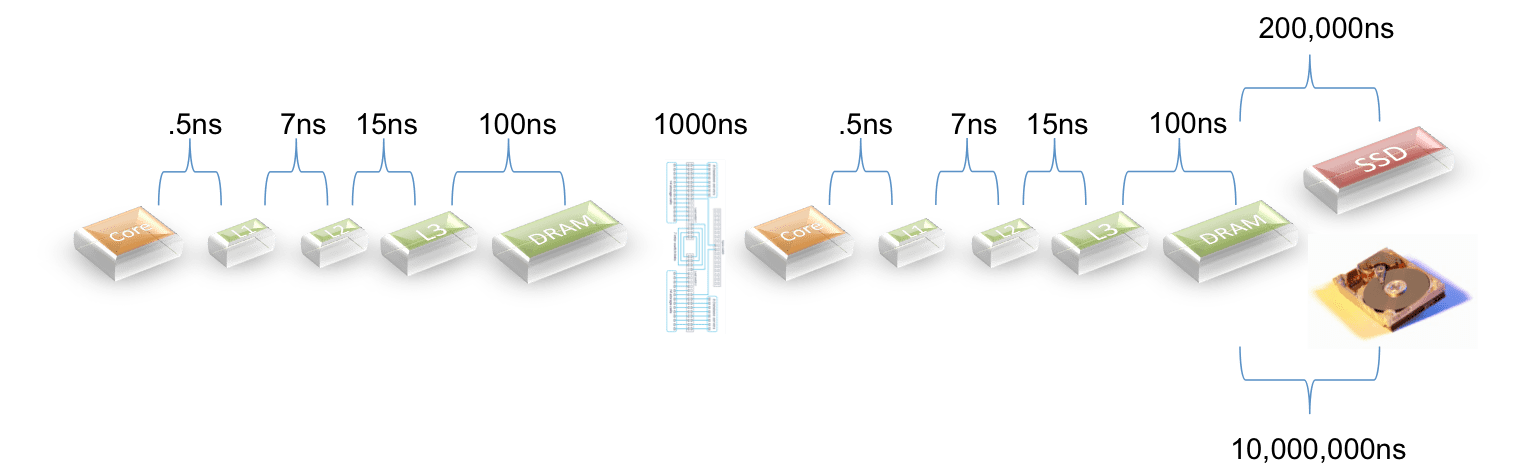
For latencies I used the picture below:
The exception is that for products that use PCIe to access SSDs I cut the latency by 1/3 based on some input from a vendor. I could not find details on the latency for Teradata’s Bynet so I assumed that it is comparable with Infiniband and the newest 10GigE switches.
Here is what I came up with:
Database
Total Latency(ns)
Price/Performance
Delta
HANA
90
1,800
–
HANA (2 nodes)
1190
23,800
13x
Exadata X3
2,054,523
13,559,854
7533x
Teradata
4,121,190
27,199,854
15111x
Greenplum
10,001,190
30,003,570
16669x
I suppose that if a model seems to reflect reality then it is useful?
HANA has the lowest latency because it is in-memory. When there are two nodes a penalty is paid for crossing the network… this makes sense.
Exadata does well because the X3 product has SSD cache and I assumed an 80% hit ratio.
Teradata does a little worse because I assumed a lower hit ratio (they have less SSD per TB of data).
Greenplum does worse as they do all I/O against disks.
Note the penalty paid whenever you have to go to disk.
Let me say again… this model ignores lots of software features that would affect performance… but it is pretty interesting as a start…